
Marker Interfaces in Java
What is a Marker Interface?
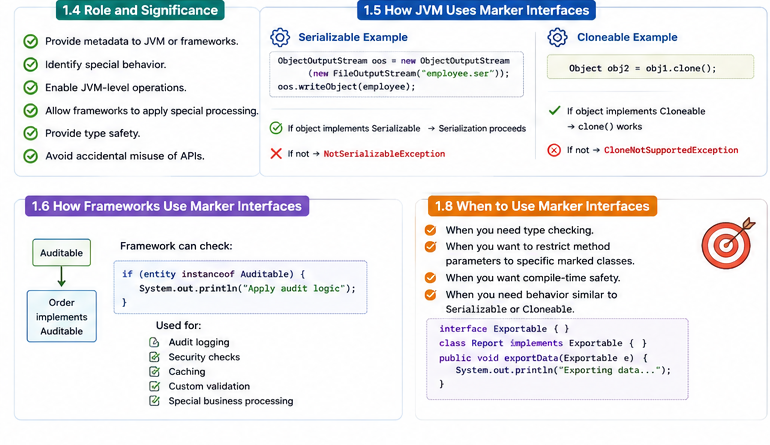
A marker interface is an empty interface. It has no methods or fields, but it marks a class with a special capability that Java or a framework can check.
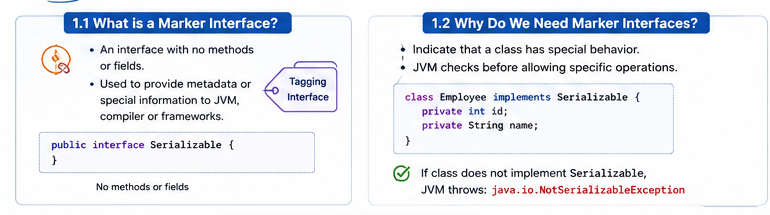
Marker interface
        │
        ├── no methods
        ├── no fields
        └── provides metadata or a capability

Employee implements Serializable
        │
        └── Java may save Employee as a byte stream
Common examples include
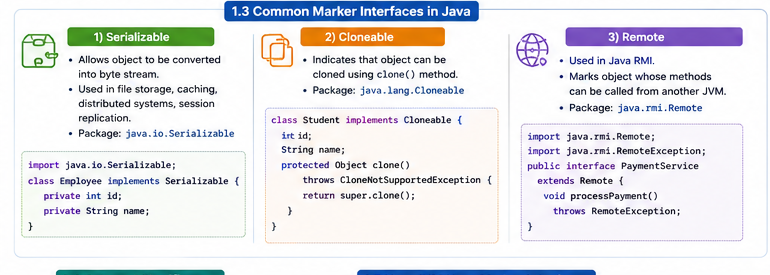
java.io.Serializable,
java.io.Externalizable,
java.lang.Cloneable, and
java.util.RandomAccess. Another classic example is
java.rmi.Remote, which identifies an interface whose
methods may be invoked from another JVM through Java RMI.
How Does a Marker Interface Work?
A marker interface is checked with instanceof or by a
library that understands the marker. The class receives no method
implementation from the interface; the marker simply communicates a
promise or capability.
interface Auditable { }

class Order implements Auditable {
}

Object value = new Order();
if (value instanceof Auditable) {
    System.out.println("Audit this object");
}
This is different from a normal interface. A normal interface tells a class which methods it must implement. A marker interface tells Java or a framework that the class belongs to a special category.
| Advantage | Limitation |
|---|---|
| Very simple capability check | No method contract or behavior |
| Works naturally with polymorphism | It can be unclear what the marker promises |
| Supported by the JVM and standard libraries | Annotations are often better for configurable metadata |
Serializable
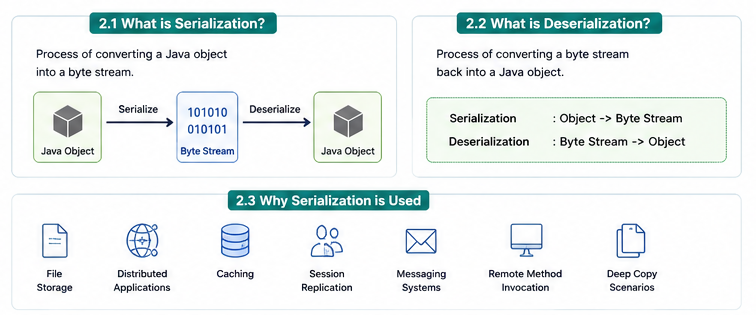
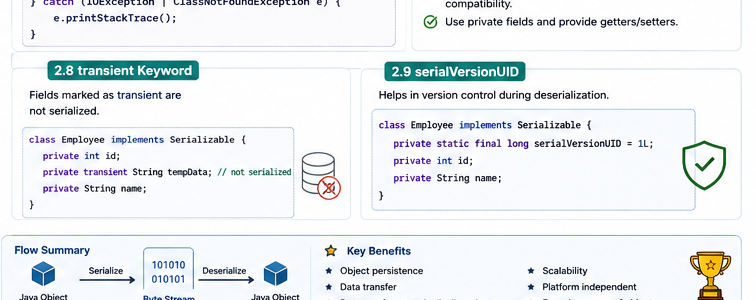
Serializable allows an object to be converted into bytes.
Saving the object is serialization; rebuilding it
from bytes is deserialization.
import java.io.Serializable;

public class Employee implements Serializable {
    private static final long serialVersionUID = 1L;

    private final int id;
    private final String name;
    private transient String password;

    public Employee(int id, String name, String password) {
        this.id = id;
        this.name = name;
        this.password = password;
    }
}
The Serializable Object Graph
Serialization starts at the object passed to
writeObject(). Java follows its fields and serializes the
reachable object graph. If a referenced object is not serializable,
the operation fails.
Employee
   │
   ├── String name        ✓ Serializable
   ├── Address address    ✓ only if Address implements Serializable
   └── Thread thread      ✗ not serializable
Mark a field transient when it can be recreated, should
not be stored, or contains a sensitive value. After deserialization,
transient fields receive default values such as
null, 0, or false.
What is serialVersionUID?
serialVersionUID is a version number for a serializable
class. During deserialization, Java compares the stored version with
the current class version. If they do not match, Java may throw
InvalidClassException.
private static final long serialVersionUID = 1L;
Class Version Compatibility
A saved stream may outlive the application version that created it.
Keep the same serialVersionUID when changes are
compatible, such as adding a field that can use a default value.
Change the ID when old data must no longer be accepted.
// Version 1
class User implements Serializable {
    private static final long serialVersionUID = 1L;
    private String name;
}

// Adding an optional field can remain compatible
class User implements Serializable {
    private static final long serialVersionUID = 1L;
    private String name;
    private String nickname; // null when reading old data
}
Serialization and Deserialization
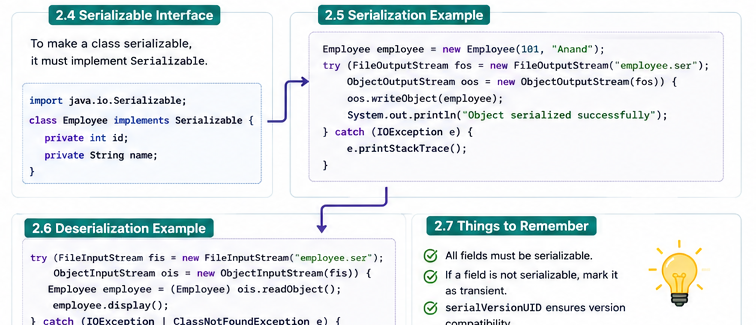
Employee employee = new Employee(101, "Anand", "secret");

try (ObjectOutputStream output =
         new ObjectOutputStream(
             new FileOutputStream("employee.ser"))) {
    output.writeObject(employee);
}

try (ObjectInputStream input =
         new ObjectInputStream(
             new FileInputStream("employee.ser"))) {
    Employee restored = (Employee) input.readObject();
    System.out.println(restored);
}
A field marked transient is skipped. It is useful for
passwords, temporary values, caches, or data that should not be saved.
Every non-transient field must itself be serializable.
Custom Serialization Hooks
A serializable class can define private
writeObject() and readObject() methods to
validate or customize its state. These are special hooks called by
Java's serialization mechanism.
private void writeObject(ObjectOutputStream output)
        throws IOException {
    output.defaultWriteObject();
    // Write only a safe representation of a value.
}

private void readObject(ObjectInputStream input)
        throws IOException, ClassNotFoundException {
    input.defaultReadObject();
    // Validate state after reading.
    if (name == null || name.isBlank()) {
        throw new InvalidObjectException("Name is required");
    }
}
Remote
java.rmi.Remote is a marker interface used by Java RMI.
An interface that extends it declares methods that may be called by a
client in another JVM. Remote methods normally declare
RemoteException because network communication can fail.
import java.rmi.Remote;
import java.rmi.RemoteException;

public interface PaymentService extends Remote {
    void processPayment(long orderId) throws RemoteException;
}
Externalizable
Externalizable gives the class complete control over what
is written and read. It extends Serializable and requires
a public no-argument constructor plus
writeExternal() and readExternal().
import java.io.*;

public class Product implements Externalizable {
    private int id;
    private String name;
    private double price;

    public Product() {
        // Required for deserialization
    }

    public Product(int id, String name, double price) {
        this.id = id;
        this.name = name;
        this.price = price;
    }

    @Override
    public void writeExternal(ObjectOutput output) throws IOException {
        output.writeInt(id);
        output.writeUTF(name);
        output.writeDouble(price);
    }

    @Override
    public void readExternal(ObjectInput input)
            throws IOException {
        id = input.readInt();
        name = input.readUTF();
        price = input.readDouble();
    }
}
Serializable is automatic and easier.
Externalizable is manual and can be smaller or faster,
but the developer must maintain the read and write order.
Externalizable lifecycle
writeObject()
      ↓
writeExternal(output)
      ↓
bytes stored
      ↓
public no-arg constructor
      ↓
readExternal(input)
      ↓
object restored
The order is important. If you write
id, then name, then price, you
must read them in exactly the same order. With
Serializable, Java handles this field processing
automatically.
- Use
Serializablefor simple Java-managed persistence. - Use
Externalizablewhen you need explicit control. - Use JSON, records, or DTOs for most modern application APIs.
Cloneable
Cloneable tells Object.clone() that a copy
is allowed. It does not declare a clone method, so classes usually
expose a public wrapper.
public class Employee implements Cloneable {
    private int id;
    private String name;

    public Employee(int id, String name) {
        this.id = id;
        this.name = name;
    }

    @Override
    public Employee clone() {
        try {
            return (Employee) super.clone();
        } catch (CloneNotSupportedException exception) {
            throw new AssertionError(exception);
        }
    }
}

Employee first = new Employee(101, "Anand");
Employee second = first.clone();

System.out.println(first == second); // false
// Both objects contain the same values.
Shallow Copy vs Deep Copy
Shallow copy
original ──► Address object ◄── copy

Deep copy
original ──► Address object A
copy     ──► Address object B
A shallow copy duplicates primitive values but shares referenced
objects. A deep copy also creates independent copies of mutable nested
objects. Copy constructors and factory methods are often clearer than
clone() for new code.
Copy Constructor: A Clear Alternative
A copy constructor makes the copy operation explicit and avoids the
checked exception and protected method behavior of
clone().
public class Employee {
    private final int id;
    private final String name;

    public Employee(int id, String name) {
        this.id = id;
        this.name = name;
    }

    public Employee(Employee source) {
        this.id = source.id;
        this.name = source.name;
    }
}

Employee copy = new Employee(original);
Real-World Use Cases
- Serializable: legacy cache files, session replication, and Java-only object storage.
- Externalizable: compact binary formats where the application controls every field.
- Cloneable: legacy APIs that require cloning or simple prototypes.
- Remote: Java RMI contracts whose methods can cross JVM boundaries.
- Custom markers: internal rules such as
Auditable,Exportable, orCacheable.
Quick Comparison
| Interface | Purpose | Main concern |
|---|---|---|
Serializable |
Automatic object serialization | Security and version compatibility |
Externalizable |
Manual serialization control | Must maintain read/write order |
Cloneable |
Allow object cloning | Shallow-copy surprises |
Remote |
Identify RMI remote contracts | Remote failures and network boundaries |
Continue learning