
Spring Boot REST API Tutorial
Watch on YouTubeSpring Boot REST API Tutorial
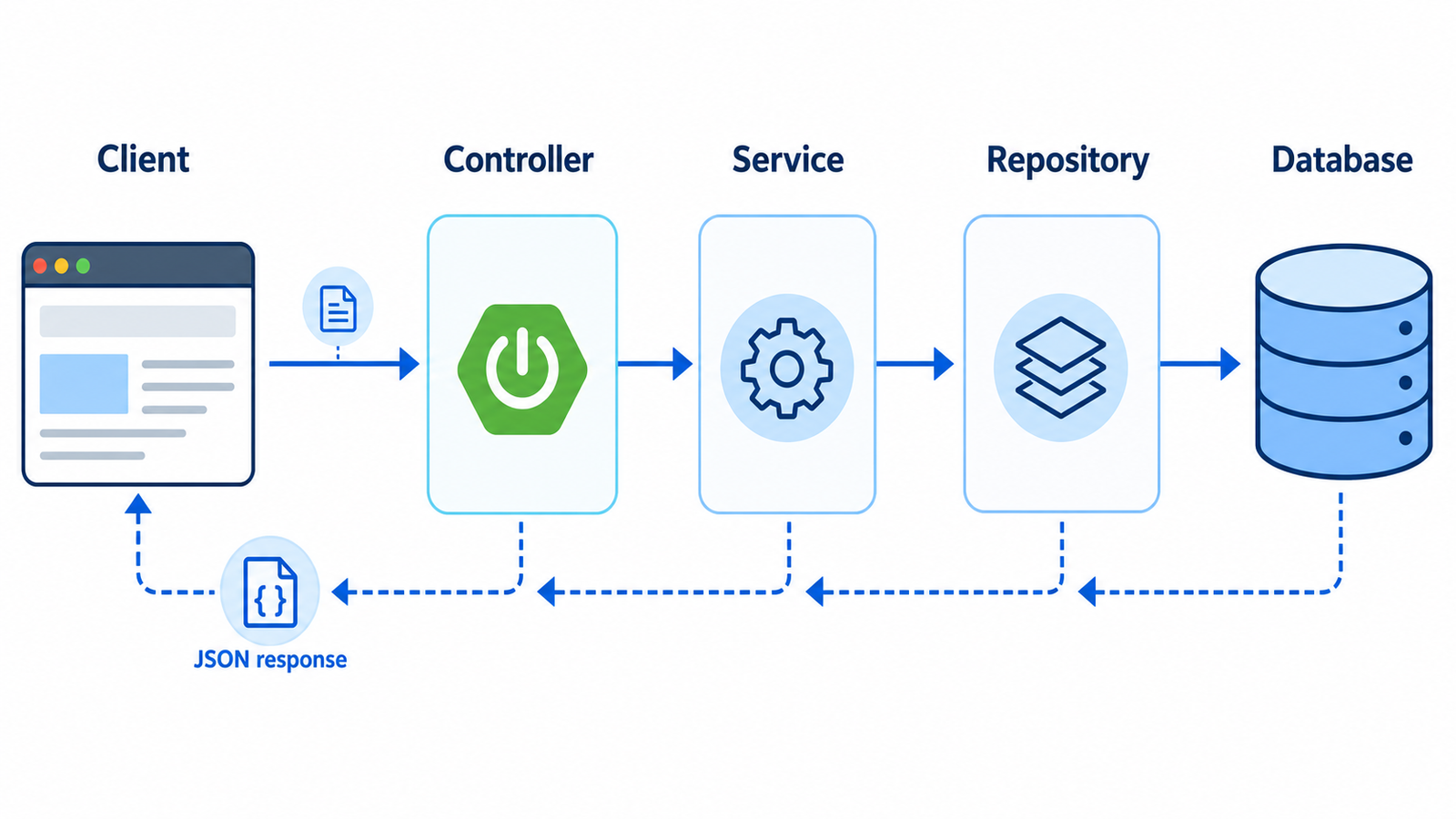
HTTP design basics
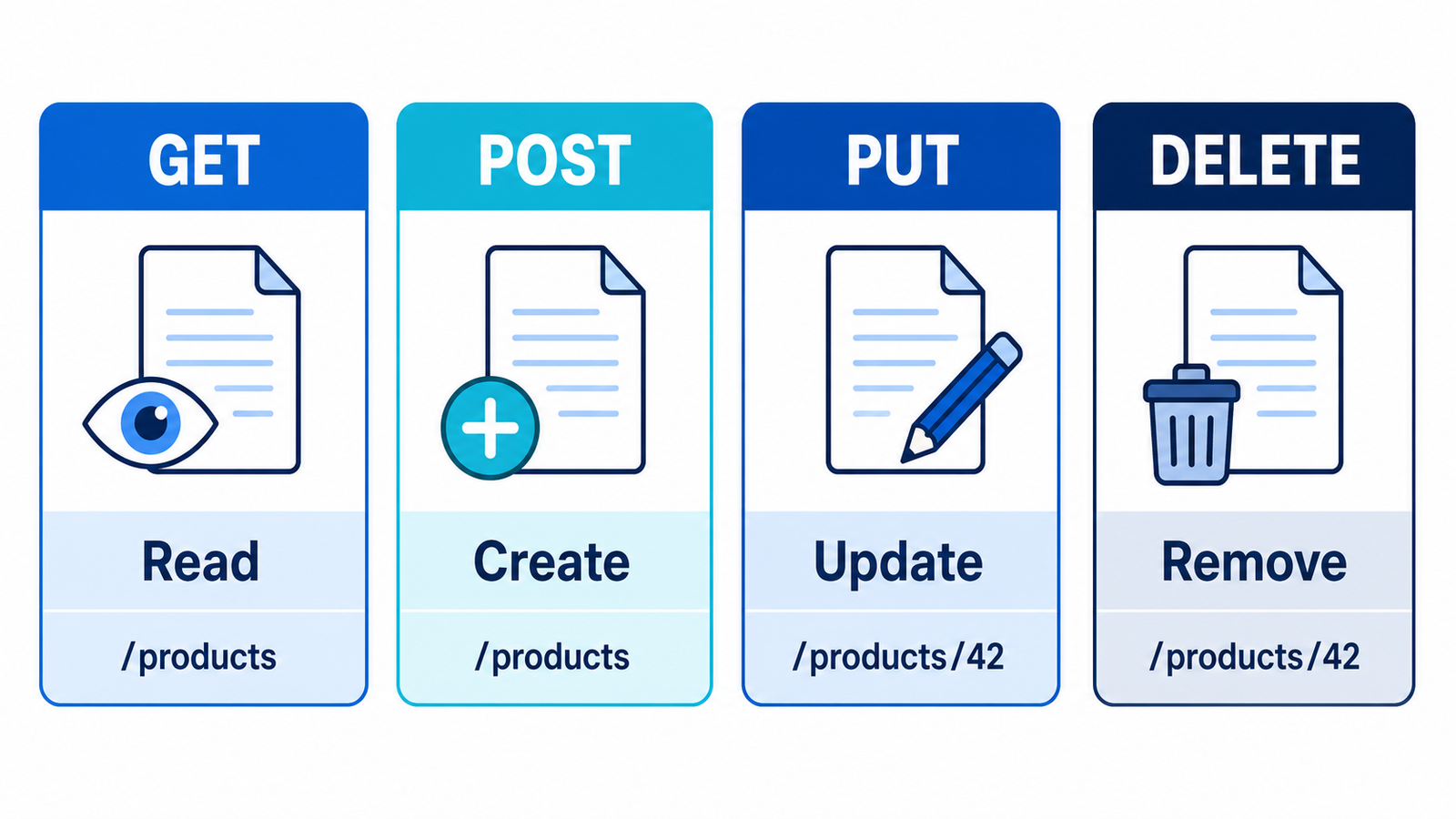
Before writing controllers, agree on what each HTTP method means for your resources. Consistent method usage lets clients (and caches, proxies, and browsers) make correct assumptions about safety and retry behavior.
| Method | Purpose | Typical response |
|---|---|---|
| GET | Read data | 200 OK |
| POST | Create data | 201 Created |
| PUT/PATCH | Update data | 200 OK |
| DELETE | Remove data | 204 No Content |
HTTP methods explained with a store example
Imagine a product resource at /api/products. The URL names
the resource; the HTTP method tells the server what action the client
wants. A method should be used consistently so mobile apps, browsers,
and other services can understand the API.
| Method | Example | Meaning | Safe to repeat? |
|---|---|---|---|
| GET | GET /api/products/10 |
Read product 10 | Yes |
| POST | POST /api/products |
Create a new product | Usually no |
| PUT | PUT /api/products/10 |
Replace the complete product | Yes |
| PATCH | PATCH /api/products/10 |
Change selected fields | Design carefully |
| DELETE | DELETE /api/products/10 |
Remove product 10 | Yes |
GET: read resources
Use GET when the client wants data and does not want to change the database. Filters, pagination, and sorting belong in query parameters.
GET /api/products?page=0&size=20&sort=name,asc
GET /api/products/10
Typical responses are 200 OK when data is found and
404 Not Found when a single product does not exist.
POST: create a resource
Use POST when the server generates the new resource ID. Return
201 Created and a Location header pointing to
the created resource.
POST /api/products
Content-Type: application/json

{
  "name": "Mechanical Keyboard",
  "price": 2500.00,
  "stock": 25
}
PUT: replace a complete resource
PUT replaces the complete representation at a known URL. Require all updateable fields in the request so that an omitted field does not get accidentally erased or assigned an unexpected default.
PUT /api/products/10
Content-Type: application/json

{
  "name": "Mechanical Keyboard Pro",
  "price": 3200.00,
  "stock": 18
}
PATCH: update selected fields
PATCH changes only the fields included in the request. It is useful for
a quick stock or price update. The service must distinguish between an
omitted field and a field explicitly set to null if null is
meaningful in your application.
PATCH /api/products/10
Content-Type: application/json

{
  "price": 2999.00
}
DELETE: remove a resource
DELETE removes a resource or marks it inactive when your application
uses soft deletes. Return 204 No Content after a successful
deletion. Do not return a misleading success when the resource never
existed; use 404 Not Found when that distinction matters.
DELETE /api/products/10

204 No Content
A complete CRUD example
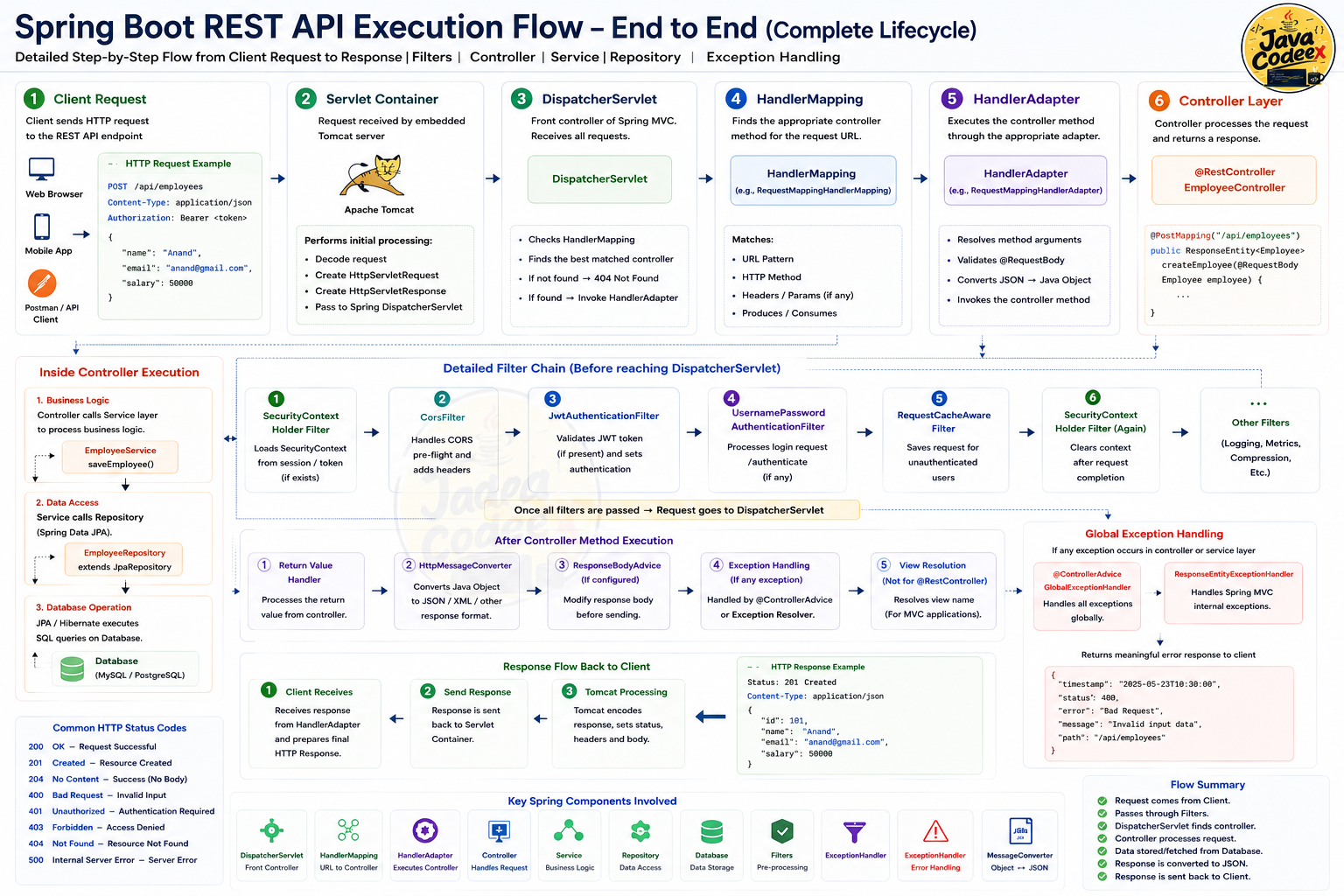
The controller below manages a simple Task resource. It
supports listing, reading one task, creating, updating, and deleting
— the five operations almost every resource needs. Notice how each
method returns a ResponseEntity so it can control the exact
status code, not just the body.
@RestController
@RequestMapping("/api/tasks")
class TaskController {
    private final TaskService service;

    TaskController(TaskService service) {
        this.service = service;
    }

    @GetMapping
    List<TaskResponse> list() {
        return service.findAll();
    }

    @GetMapping("/{id}")
    ResponseEntity<TaskResponse> getById(@PathVariable Long id) {
        return service.findById(id)
                .map(ResponseEntity::ok)
                .orElseGet(() -> ResponseEntity.notFound().build());
    }

    @PostMapping
    ResponseEntity<TaskResponse> create(@Valid @RequestBody CreateTaskRequest request) {
        TaskResponse created = service.create(request);
        URI location = URI.create("/api/tasks/" + created.id());
        return ResponseEntity.created(location).body(created);
    }

    @PutMapping("/{id}")
    ResponseEntity<TaskResponse> update(@PathVariable Long id, @Valid @RequestBody UpdateTaskRequest request) {
        return service.update(id, request)
                .map(ResponseEntity::ok)
                .orElseGet(() -> ResponseEntity.notFound().build());
    }

    @DeleteMapping("/{id}")
    ResponseEntity<Void> delete(@PathVariable Long id) {
        boolean removed = service.delete(id);
        return removed ? ResponseEntity.noContent().build() : ResponseEntity.notFound().build();
    }
}POST that creates a resource should
return 201 Created with a Location header
pointing at the new resource.
ResponseEntity.created(location) sets that header for you.
End-to-end product API
The following example shows how a real application separates HTTP, business logic, and database access. A request travels through the controller, service, and repository, then the result is mapped to a response DTO.
1. Entity and request DTOs
@Entity
@Table(name = "products")
public class Product {
    @Id
    @GeneratedValue(strategy = GenerationType.IDENTITY)
    private Long id;
    private String name;
    private BigDecimal price;
    private int stock;

    // constructors, getters, and setters
}

public record CreateProductRequest(
        @NotBlank(message = "Name is required") String name,
        @Positive(message = "Price must be greater than zero")
        BigDecimal price,
        @PositiveOrZero(message = "Stock cannot be negative") int stock) {
}

public record UpdateProductRequest(
        @NotBlank String name,
        @Positive BigDecimal price,
        @PositiveOrZero int stock) {
}

public record ProductPatchRequest(
        String name,
        BigDecimal price,
        Integer stock) {
}
2. Repository
public interface ProductRepository
        extends JpaRepository<Product, Long> {

    Page<Product> findByNameContainingIgnoreCase(
            String name, Pageable pageable);
}
3. Service
The service owns business rules such as checking stock and deciding what to do when a product is missing. It does not know anything about HTTP status codes.
@Service
@Transactional
public class ProductService {
    private final ProductRepository repository;

    public ProductService(ProductRepository repository) {
        this.repository = repository;
    }

    @Transactional(readOnly = true)
    public Page<Product> findAll(String name, Pageable pageable) {
        return name == null || name.isBlank()
                ? repository.findAll(pageable)
                : repository.findByNameContainingIgnoreCase(name, pageable);
    }

    @Transactional(readOnly = true)
    public Product findById(Long id) {
        return repository.findById(id)
                .orElseThrow(() -> new ProductNotFoundException(id));
    }

    public Product create(CreateProductRequest request) {
        Product product = new Product();
        product.setName(request.name());
        product.setPrice(request.price());
        product.setStock(request.stock());
        return repository.save(product);
    }

    public Product replace(Long id, UpdateProductRequest request) {
        Product product = findById(id);
        product.setName(request.name());
        product.setPrice(request.price());
        product.setStock(request.stock());
        return product;
    }

    public Product patch(Long id, ProductPatchRequest request) {
        Product product = findById(id);
        if (request.name() != null) product.setName(request.name());
        if (request.price() != null) product.setPrice(request.price());
        if (request.stock() != null) product.setStock(request.stock());
        return product;
    }

    public void delete(Long id) {
        Product product = findById(id);
        repository.delete(product);
    }
}
4. Controller
@RestController
@RequestMapping("/api/products")
public class ProductController {
    private final ProductService service;

    public ProductController(ProductService service) {
        this.service = service;
    }

    @GetMapping
    public Page<Product> findAll(
            @RequestParam(required = false) String name,
            @PageableDefault(size = 20, sort = "name")
            Pageable pageable) {
        return service.findAll(name, pageable);
    }

    @GetMapping("/{id}")
    public Product findById(@PathVariable Long id) {
        return service.findById(id);
    }

    @PostMapping
    public ResponseEntity<Product> create(
            @Valid @RequestBody CreateProductRequest request) {
        Product created = service.create(request);
        URI location = URI.create("/api/products/" + created.getId());
        return ResponseEntity.created(location).body(created);
    }

    @PutMapping("/{id}")
    public Product replace(@PathVariable Long id,
                           @Valid @RequestBody UpdateProductRequest request) {
        return service.replace(id, request);
    }

    @PatchMapping("/{id}")
    public Product patch(@PathVariable Long id,
                         @RequestBody ProductPatchRequest request) {
        return service.patch(id, request);
    }

    @DeleteMapping("/{id}")
    @ResponseStatus(HttpStatus.NO_CONTENT)
    public void delete(@PathVariable Long id) {
        service.delete(id);
    }
}
5. Test the API
# List products
curl "http://localhost:8080/api/products?page=0&size=10&sort=name,asc"

# Create a product
curl -X POST http://localhost:8080/api/products \
  -H "Content-Type: application/json" \
  -d '{"name":"Monitor","price":18000,"stock":12}'

# Read one product
curl http://localhost:8080/api/products/1

# Replace the complete product
curl -X PUT http://localhost:8080/api/products/1 \
  -H "Content-Type: application/json" \
  -d '{"name":"4K Monitor","price":22000,"stock":8}'

# Update only the stock
curl -X PATCH http://localhost:8080/api/products/1 \
  -H "Content-Type: application/json" \
  -d '{"stock":25}'

# Delete a product
curl -X DELETE http://localhost:8080/api/products/1
Build a PostgreSQL-backed CRUD API
An in-memory list is useful for learning controller mappings, but real applications need durable storage. PostgreSQL keeps records after a restart, supports transactions and constraints, and gives the API a reliable source of truth. Spring Boot connects the HTTP layer to PostgreSQL through Spring Data JPA and the PostgreSQL JDBC driver.
1. Add the PostgreSQL dependencies
Generate a Spring Boot project with Spring Web, Spring Data JPA, PostgreSQL Driver, and Validation. Spring Web handles HTTP requests, JPA maps entities to tables, the driver opens the database connection, and Validation checks request data before it reaches the service.
<dependency>
    <groupId>org.springframework.boot</groupId>
    <artifactId>spring-boot-starter-web</artifactId>
</dependency>
<dependency>
    <groupId>org.springframework.boot</groupId>
    <artifactId>spring-boot-starter-data-jpa</artifactId>
</dependency>
<dependency>
    <groupId>org.postgresql</groupId>
    <artifactId>postgresql</artifactId>
    <scope>runtime</scope>
</dependency>
2. Configure PostgreSQL safely
Create a database such as taskdb, then configure the
connection in application.properties. Do not commit a
real password. Use environment variables or a secret manager outside
local development.
spring.datasource.url=jdbc:postgresql://localhost:5432/taskdb
spring.datasource.username=${DB_USERNAME:postgres}
spring.datasource.password=${DB_PASSWORD:change-me}
spring.jpa.hibernate.ddl-auto=validate
spring.jpa.open-in-view=false
spring.jpa.show-sql=false
ddl-auto=validate checks that the schema matches the
entities without silently changing production tables. Use Flyway or
Liquibase for versioned schema migrations. For a throwaway local demo,
create-drop or update can be convenient, but
they should not replace controlled migrations in production.
3. Map the entity and repository
The entity represents a database row. The repository provides the common CRUD operations without handwritten SQL. Keep request and response DTOs separate from the entity so internal columns are not accidentally exposed by the REST API.
@Entity
@Table(name = "tasks")
public class Task {
    @Id
    @GeneratedValue(strategy = GenerationType.IDENTITY)
    private Long id;

    @Column(nullable = false, length = 160)
    private String title;
    private boolean done;
    // getters and setters
}

public interface TaskRepository extends JpaRepository<Task, Long> {
    Page<Task> findByTitleContainingIgnoreCase(String title, Pageable pageable);
}
4. Put CRUD rules in the service
The service is the boundary for database transactions and business rules. It should decide whether a missing record becomes a not-found error, apply updates, and return data that the controller can map to a safe DTO.
@Service
@Transactional
class TaskService {
    private final TaskRepository repository;

    TaskService(TaskRepository repository) {
        this.repository = repository;
    }

    @Transactional(readOnly = true)
    Page<Task> findAll(Pageable pageable) {
        return repository.findAll(pageable);
    }

    Task findRequired(Long id) {
        return repository.findById(id)
            .orElseThrow(() -> new TaskNotFoundException(id));
    }

    Task create(CreateTaskRequest request) {
        Task task = new Task();
        task.setTitle(request.title());
        return repository.save(task);
    }

    Task replace(Long id, UpdateTaskRequest request) {
        Task task = findRequired(id);
        task.setTitle(request.title());
        task.setDone(request.done());
        return task;
    }

    void delete(Long id) {
        repository.delete(findRequired(id));
    }
}
5. Expose all CRUD endpoints
The controller translates HTTP requests into service calls. Create
returns 201 Created, reads return 200 OK, a
successful replacement returns 200 OK or
204 No Content, and deletion returns
204 No Content. Missing IDs should consistently return
404 Not Found through the global exception handler.
@RestController
@RequestMapping("/api/tasks")
class TaskController {
    private final TaskService service;

    @GetMapping
    Page<TaskResponse> list(Pageable pageable) {
        return service.findAll(pageable).map(TaskResponse::from);
    }

    @GetMapping("/{id}")
    TaskResponse get(@PathVariable Long id) {
        return TaskResponse.from(service.findRequired(id));
    }

    @PostMapping
    ResponseEntity<TaskResponse> create(@Valid @RequestBody CreateTaskRequest request) {
        TaskResponse response = TaskResponse.from(service.create(request));
        URI location = URI.create("/api/tasks/" + response.id());
        return ResponseEntity.created(location).body(response);
    }

    @PutMapping("/{id}")
    TaskResponse replace(@PathVariable Long id,
                         @Valid @RequestBody UpdateTaskRequest request) {
        return TaskResponse.from(service.replace(id, request));
    }

    @DeleteMapping("/{id}")
    @ResponseStatus(HttpStatus.NO_CONTENT)
    void delete(@PathVariable Long id) {
        service.delete(id);
    }
}
6. Test the PostgreSQL CRUD flow
Test the complete lifecycle against a dedicated local database or a disposable container. Verify both the HTTP contract and the database state: a created row should be readable, an update should persist after a new request, and a deleted row should return 404 on the next read.
# Create
curl -i -X POST http://localhost:8080/api/tasks \
  -H "Content-Type: application/json" \
  -d '{"title":"Connect PostgreSQL","done":false}'

# Read all and read one
curl "http://localhost:8080/api/tasks?page=0&size=10"
curl http://localhost:8080/api/tasks/1

# Replace the complete resource
curl -i -X PUT http://localhost:8080/api/tasks/1 \
  -H "Content-Type: application/json" \
  -d '{"title":"Verify PostgreSQL CRUD","done":true}'

# Delete
curl -i -X DELETE http://localhost:8080/api/tasks/1@PathVariable, @RequestParam, and @RequestBody
Spring MVC pulls request data into method parameters using a small set of annotations. Each one targets a different part of the HTTP request.
@PathVariable reads a segment of the URL path — use
it for values that identify a specific resource.
@GetMapping("/{id}")
ResponseEntity<TaskResponse> getById(@PathVariable Long id) {
    return service.findById(id)
            .map(ResponseEntity::ok)
            .orElseGet(() -> ResponseEntity.notFound().build());
}
@RequestParam reads a query string value. It can be
optional, and you can supply a default so the parameter is never
null.
@GetMapping
List<TaskResponse> list(
        @RequestParam(required = false) String status,
        @RequestParam(defaultValue = "false") boolean overdueOnly) {
    return service.findAll(status, overdueOnly);
}
@RequestBody deserializes the JSON request body into a Java
object, typically a DTO record annotated with validation constraints.
@PostMapping
ResponseEntity<TaskResponse> create(@Valid @RequestBody CreateTaskRequest request) {
    TaskResponse created = service.create(request);
    return ResponseEntity.created(URI.create("/api/tasks/" + created.id())).body(created);
}
Which request annotation should you use?
Choose the annotation based on where the value belongs in the HTTP
request. A simple rule is: use @PathVariable to identify a
resource, @RequestParam to filter or control a request, and
@RequestBody to send a new or changed resource as JSON.
| Annotation | Reads from | Use it for | Example |
|---|---|---|---|
@PathVariable |
URL path | Identifying one resource | /api/products/42 |
@RequestParam |
Query string | Filtering, searching, paging, and sorting | /api/products?category=laptop |
@RequestBody |
JSON request body | Creating or updating multiple fields | {"name":"Laptop","price":75000} |
When to use @PathVariable
Use @PathVariable when the value identifies the resource
being addressed. The value is normally required, and changing it means
addressing a different resource.
GET /api/products/42

@GetMapping("/products/{id}")
public Product findProduct(@PathVariable Long id) {
    return productService.findById(id);
}
Here, 42 is not a filter. It identifies one product, so it
belongs in the URL path.
When to use @RequestParam
Use @RequestParam for optional or changeable instructions
about a collection: search text, category filters, page number, page
size, sorting, or flags. Query parameters should not change the identity
of the resource.
GET /api/products?category=office&minPrice=1000&page=0&size=20

@GetMapping("/products")
public Page<Product> search(
        @RequestParam(required = false) String category,
        @RequestParam(required = false) BigDecimal minPrice,
        @RequestParam(defaultValue = "0") int page,
        @RequestParam(defaultValue = "20") int size) {
    return productService.search(category, minPrice, page, size);
}
The same endpoint can support different searches without creating a new URL for every combination of filters.
When to use @RequestBody
Use @RequestBody when the client sends structured data,
usually JSON, to create or update a resource. Spring Boot uses Jackson
to convert the JSON into a Java DTO. The client should send the header
Content-Type: application/json.
POST /api/products
Content-Type: application/json

{
  "name": "Laptop",
  "price": 75000.00,
  "stock": 12
}

public record CreateProductRequest(
        @NotBlank String name,
        @Positive BigDecimal price,
        @PositiveOrZero int stock) {
}

public record ProductResponse(
        Long id, String name, BigDecimal price, int stock) {
}

@PostMapping("/products")
public ResponseEntity<ProductResponse> create(
        @Valid @RequestBody CreateProductRequest request) {
    ProductResponse created = productService.create(request);
    URI location = URI.create("/api/products/" + created.id());
    return ResponseEntity.created(location).body(created);
}
End-to-end JSON request processing
When a client creates a product, the JSON travels through the following layers. Each layer has one responsibility, which makes the application easier to test and maintain.
1. Controller receives the JSON
@RestController
@RequestMapping("/api/products")
public class ProductController {
    private final ProductService productService;

    public ProductController(ProductService productService) {
        this.productService = productService;
    }

    @PostMapping
    public ResponseEntity<ProductResponse> create(
            @Valid @RequestBody CreateProductRequest request) {
        ProductResponse response = productService.create(request);
        return ResponseEntity
                .created(URI.create("/api/products/" + response.id()))
                .body(response);
    }
}
2. Service applies business rules
@Service
public class ProductService {
    private final ProductRepository repository;

    public ProductService(ProductRepository repository) {
        this.repository = repository;
    }

    @Transactional
    public ProductResponse create(CreateProductRequest request) {
        if (repository.existsByNameIgnoreCase(request.name())) {
            throw new DuplicateProductException(request.name());
        }

        Product product = new Product();
        product.setName(request.name());
        product.setPrice(request.price());
        product.setStock(request.stock());

        Product saved = repository.save(product);
        return new ProductResponse(
                saved.getId(), saved.getName(),
                saved.getPrice(), saved.getStock());
    }
}
3. Repository saves the entity
public interface ProductRepository
        extends JpaRepository<Product, Long> {

    boolean existsByNameIgnoreCase(String name);
}
4. The client receives a response
HTTP/1.1 201 Created
Location: /api/products/101
Content-Type: application/json

{
  "id": 101,
  "name": "Laptop",
  "price": 75000.00,
  "stock": 12
}
If the JSON is invalid or a required field is missing, validation stops
the request before the service runs. A global exception handler can
return 400 Bad Request with field-specific messages.
Response shape: ResponseEntity<T> vs a bare object
You can return a plain object from a controller method and Spring will
serialize it with a 200 OK status. That is fine for simple,
always-successful reads. Reach for
ResponseEntity<T> whenever the status code, headers,
or the presence of a body can vary — for example, a lookup that
might not find anything, or a create operation that needs a
Location header.
| Return type | Use when |
|---|---|
Bare object (e.g. TaskResponse) |
The operation always succeeds and always returns
200 OK with the same shape.
|
ResponseEntity<T> |
You need a different status per outcome (404, 201, 204), custom headers, or no body at all. |
null from a bare-object
method still sends 200 OK with an empty body, which is
misleading to clients. Use
ResponseEntity.notFound().build() instead when a resource
is missing.
Pagination and sorting
Returning an entire table as one JSON array does not scale. Spring
Data's Pageable lets a controller accept page, size, and
sort query parameters automatically, and a repository can return a
Page<T> that carries the data plus paging metadata.
interface TaskRepository extends JpaRepository<Task, Long> {
}

@GetMapping
Page<TaskResponse> list(@PageableDefault(size = 20, sort = "createdAt") Pageable pageable) {
    return repository.findAll(pageable).map(TaskMapper::toResponse);
}
A request like
GET /api/tasks?page=1&size=10&sort=title,asc is
bound directly into the Pageable argument — no manual
parsing required. The resulting Page<T> serializes
with content, totalElements,
totalPages, and the current page number.
API versioning strategies
APIs evolve. Pick a versioning strategy before you need it, and keep it consistent across endpoints.
| Strategy | Example | Trade-off |
|---|---|---|
| URI path | /api/v1/tasks |
Simple, visible, but multiplies routes across versions. |
| Custom header | X-API-Version: 2 |
Keeps URLs stable, but is less discoverable and harder to test in a browser. |
| Accept header (media type) | Accept: application/vnd.app.v2+json |
Follows HTTP content negotiation closely, but adds client complexity. |
DTO mapping pattern
A DTO (data transfer object) describes exactly what a client sends or receives. An entity describes how data is persisted. They usually diverge: an entity might carry lazy associations, audit columns, or internal flags that should never appear in an HTTP response, and a create request rarely matches every entity field one-to-one.
// What the database stores
@Entity
class Task {
    @Id @GeneratedValue Long id;
    String title;
    boolean done;
    Instant createdAt;
    @ManyToOne User owner;
}

// What a client sends to create a task
record CreateTaskRequest(@NotBlank String title) {}

// What a client receives back
record TaskResponse(Long id, String title, boolean done, Instant createdAt) {}

class TaskMapper {
    static TaskResponse toResponse(Task task) {
        return new TaskResponse(task.getId(), task.getTitle(), task.isDone(), task.getCreatedAt());
    }

    static Task toEntity(CreateTaskRequest request) {
        Task task = new Task();
        task.setTitle(request.title());
        return task;
    }
}
Mapping by hand (or with a library like MapStruct) keeps persistence details out of your public contract. Exposing entities directly tends to leak internal fields, breaks when you refactor the schema, and can trigger lazy-loading errors when Jackson tries to serialize an association outside a transaction.
Control responses with ResponseEntity
Returning an object is convenient when every successful request has the
same response behavior. Use ResponseEntity<T> when the
controller must choose the HTTP status, headers, or body at runtime.
This is useful for created resources, validation failures, missing
records, and responses that need location metadata.
@PostMapping
ResponseEntity<TaskResponse> create(@Valid @RequestBody CreateTaskRequest request) {
    Task task = taskService.create(request);
    URI location = URI.create("/api/tasks/" + task.getId());

    return ResponseEntity
        .created(location)
        .body(taskMapper.toResponse(task));
}

@GetMapping("/{id}")
ResponseEntity<TaskResponse> findOne(@PathVariable long id) {
    return taskService.findById(id)
        .map(task -> ResponseEntity.ok(taskMapper.toResponse(task)))
        .orElseGet(() -> ResponseEntity.notFound().build());
}
Common builder methods include ok() for a successful body,
created(location) for a new resource,
noContent() when there is nothing to return, and
badRequest() or notFound() for client errors.
Prefer a consistent error body across the API so clients can handle
failures without endpoint-specific rules.
Read and write HTTP headers
HTTP headers carry metadata around a request or response. Spring MVC
can bind a single header with @RequestHeader, while
HttpHeaders is useful when an endpoint needs to inspect
several values or add response metadata.
@GetMapping("/search")
ResponseEntity<List<TaskResponse>> search(
        @RequestHeader(value = "X-Correlation-Id", required = false) String correlationId,
        @RequestParam String query) {
    List<TaskResponse> results = taskService.search(query);
    HttpHeaders headers = new HttpHeaders();
    headers.set("X-Correlation-Id", correlationId != null ? correlationId : UUID.randomUUID().toString());
    headers.setCacheControl(CacheControl.noCache());
    return new ResponseEntity<>(results, headers, HttpStatus.OK);
}
Use standard headers such as Location,
Cache-Control, ETag, and
Content-Type when they describe real HTTP behavior. Do not
place passwords, access tokens, or other secrets in custom headers or
log them without redaction. Headers are part of the public API contract,
so document required values and validate them at the boundary.
PUT vs POST in REST APIs
Choose the HTTP method based on the operation's meaning. POST usually
asks the server to create a new resource under a collection. The server
chooses the identifier, so repeating the same request may create more
than one resource. Return 201 Created and a
Location header when creation succeeds.
PUT replaces the representation at a client-known URI, such as
/api/tasks/42. A well-designed PUT is idempotent: sending
the same complete representation several times leaves the resource in
the same state. Return 200 OK with a representation or
204 No Content when the update succeeds without a body.
Use PATCH when the API intentionally supports partial updates.
| Method | Typical use | Example | Idempotent? |
|---|---|---|---|
POST |
Create under a collection or trigger a command | POST /api/tasks |
Usually no |
PUT |
Replace a known resource | PUT /api/tasks/42 |
Yes, when designed correctly |
PATCH |
Apply selected field changes | PATCH /api/tasks/42 |
Depends on the operation |
Test response status and headers
REST tests should verify more than a response body. Check the status code, content type, important headers, and JSON fields that form the client contract. A focused MVC test keeps the feedback loop fast while still checking controller mappings and validation behavior.
mockMvc.perform(post("/api/tasks")
        .contentType(MediaType.APPLICATION_JSON)
        .content("{\"title\":\"Write tests\"}"))
    .andExpect(status().isCreated())
    .andExpect(header().exists(HttpHeaders.LOCATION))
.andExpect(jsonPath("$.title").value("Write tests"));Continue learning