
Spring Boot Security 6 Authentication and Authorization Tutorial
Watch on YouTubeSpring Boot 3 · Spring Security 6
Spring Boot Security: Complete Authentication and Authorization Guide
Spring Security protects Spring applications with authentication, authorization, password protection, session management, CSRF, CORS, OAuth2, JWT support, and defenses against common web attacks.
SecurityFilterChain bean; WebSecurityConfigurerAdapter is no longer used.1. Authentication vs Authorization
Authentication
Authentication verifies a user’s identity: Who are you? Common mechanisms include username and password, JWT, OAuth2 login, API keys, and HTTP Basic.
Authorization
Authorization decides what an authenticated user may access. For example, a USER can view products while an ADMIN can create, update, and delete them.
User request → Authentication → Authorization → Controller2. Required Maven Dependencies
<dependency>
  <groupId>org.springframework.boot</groupId>
  <artifactId>spring-boot-starter-security</artifactId>
</dependency>
<dependency>
  <groupId>org.springframework.boot</groupId>
  <artifactId>spring-boot-starter-web</artifactId>
</dependency>
3. Default Spring Security Behavior
After adding the security starter, Spring Boot secures every endpoint, creates a default user named user, and prints a generated password in the logs. Form login or HTTP Basic is configured automatically until you provide custom security configuration. This default setup is useful for learning, not production.
4. Complete Security Request Flow
Client request
      ↓
DelegatingFilterProxy
      ↓
FilterChainProxy
      ↓
SecurityFilterChain
      ↓
Authentication filter
      ↓
AuthenticationManager
      ↓
AuthenticationProvider
      ↓
UserDetailsService + PasswordEncoder
      ↓
SecurityContext
      ↓
AuthorizationFilter
      ↓
Controller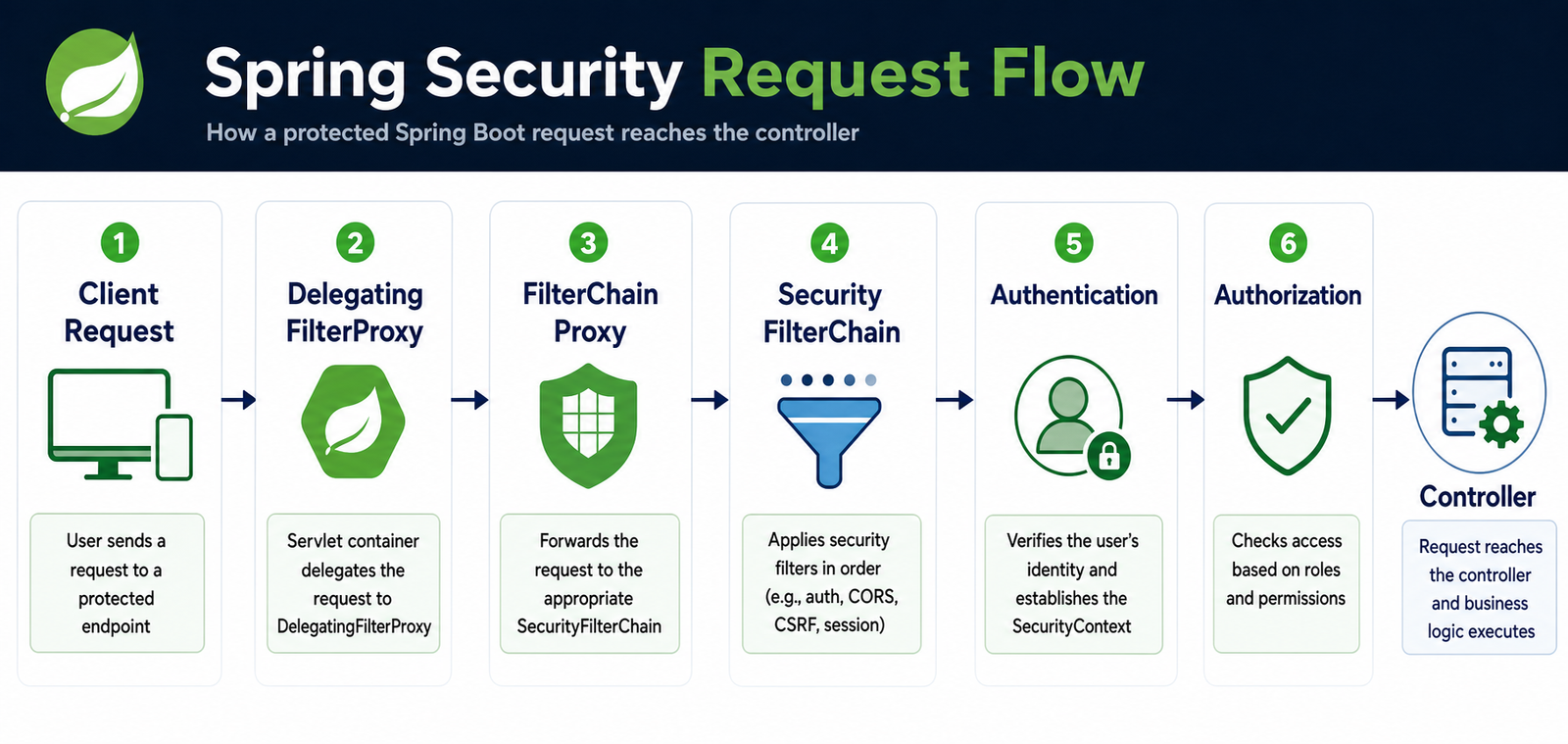
5. DelegatingFilterProxy and FilterChainProxy
DelegatingFilterProxy connects the Servlet container to Spring-managed security filters. It delegates each request to FilterChainProxy, which selects the matching SecurityFilterChain. An application can have separate chains for API, admin, and browser endpoints.
6. SecurityFilterChain Configuration
A SecurityFilterChain defines public endpoints, authentication, roles, CSRF, CORS, sessions, exception handling, and logout.
@Configuration
@EnableWebSecurity
public class SecurityConfig {

    @Bean
    SecurityFilterChain securityFilterChain(HttpSecurity http)
            throws Exception {
        http
            .authorizeHttpRequests(auth -> auth
                .requestMatchers("/public/**").permitAll()
                .requestMatchers("/admin/**").hasRole("ADMIN")
                .requestMatchers("/user/**")
                    .hasAnyRole("USER", "ADMIN")
                .anyRequest().authenticated()
            )
            .httpBasic(Customizer.withDefaults());

        return http.build();
    }
}
7. Important Spring Security Filters
SecurityContextHolderFilterloads the current security context.UsernamePasswordAuthenticationFilterprocesses form credentials.BasicAuthenticationFilterprocesses the HTTP Basic header.BearerTokenAuthenticationFilterprocesses JWT or opaque bearer tokens.AnonymousAuthenticationFilterrepresents unauthenticated requests consistently.ExceptionTranslationFilterconverts security exceptions into 401 or 403 responses.AuthorizationFilterchecks endpoint authorization rules.
8. AuthenticationManager and AuthenticationProvider
AuthenticationManager receives an authentication request and delegates it to an AuthenticationProvider. Providers implement a particular mechanism, such as database authentication, LDAP, OAuth2, or JWT.
Authentication filter
        ↓
AuthenticationManager
        ↓
DaoAuthenticationProvider
        ↓
UserDetailsService + PasswordEncoder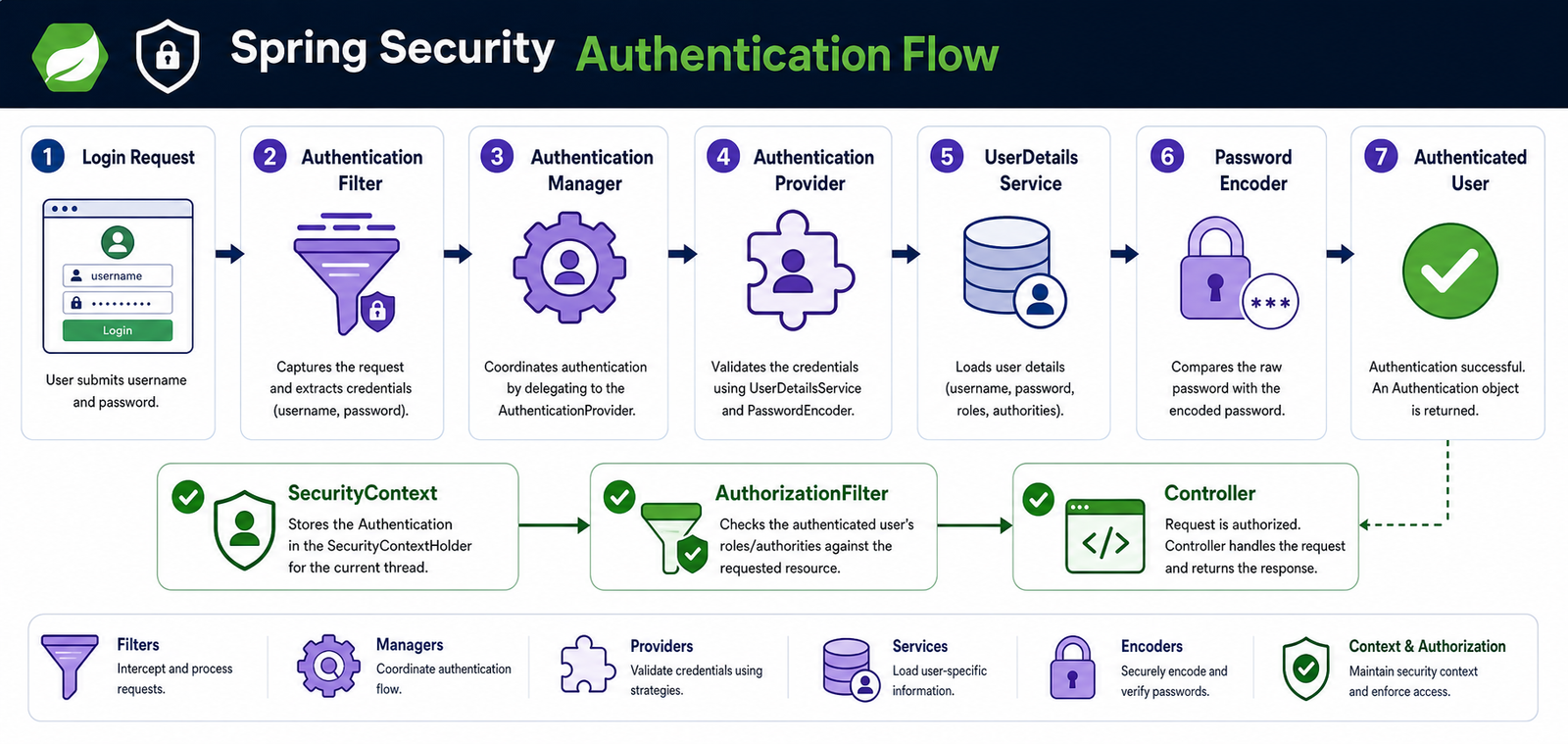
9. UserDetailsService and UserDetails
UserDetailsService loads a username, encoded password, authorities, and account status. UserDetails represents the user used by Spring Security during authentication.
@Service
public class CustomUserDetailsService
        implements UserDetailsService {

    private final UserRepository repository;

    public CustomUserDetailsService(UserRepository repository) {
        this.repository = repository;
    }

    @Override
    public UserDetails loadUserByUsername(String username) {
        UserAccount user = repository.findByUsername(username)
            .orElseThrow(() -> new UsernameNotFoundException(
                "User not found: " + username));

        return User.withUsername(user.getUsername())
            .password(user.getPassword())
            .authorities("ROLE_" + user.getRole())
            .disabled(!user.isEnabled())
            .build();
    }
}
10. PasswordEncoder and BCrypt
Never store plain-text passwords. Use an adaptive password encoder and compare raw passwords with the stored hash.
@Bean
PasswordEncoder passwordEncoder() {
    return new BCryptPasswordEncoder();
}

String hash = passwordEncoder.encode("password123");
boolean valid = passwordEncoder.matches("password123", hash);
11. Database Authentication Example
@Entity
@Table(name = "users")
public class UserAccount {
    @Id
    @GeneratedValue(strategy = GenerationType.IDENTITY)
    private Long id;

    @Column(unique = true, nullable = false)
    private String username;

    @Column(nullable = false)
    private String password;

    @Column(nullable = false)
    private String role;

    private boolean enabled = true;
    // Getters and setters
}

public interface UserRepository
        extends JpaRepository<UserAccount, Long> {
    Optional<UserAccount> findByUsername(String username);
}
Encode the password before saving a new account. Return a response DTO from a registration endpoint instead of returning the password-bearing entity.
@Service
public class RegistrationService {
    private final UserRepository repository;
    private final PasswordEncoder encoder;

    public RegistrationService(UserRepository repository,
                               PasswordEncoder encoder) {
        this.repository = repository;
        this.encoder = encoder;
    }

    public UserAccount register(UserAccount user) {
        user.setPassword(encoder.encode(user.getPassword()));
        if (user.getRole() == null) user.setRole("USER");
        return repository.save(user);
    }
}
12. Role-Based Authorization
.authorizeHttpRequests(auth -> auth
    .requestMatchers("/public/**").permitAll()
    .requestMatchers("/admin/**").hasRole("ADMIN")
    .requestMatchers("/employee/**")
        .hasAnyRole("USER", "ADMIN")
    .anyRequest().authenticated()
)
hasRole("ADMIN") checks ROLE_ADMIN internally. hasAuthority("EMPLOYEE_WRITE") checks the exact authority string.
13. Method-Level Security
@Configuration
@EnableMethodSecurity
class MethodSecurityConfig { }

@PreAuthorize("hasRole('ADMIN')")
@DeleteMapping("/{id}")
public void deleteEmployee(@PathVariable Long id) {
    employeeService.delete(id);
}
Method security is useful when business rules must be enforced beyond URL patterns. You can also use hasAnyRole, hasAuthority, and expressions involving authentication.name.
14. Authentication Success and Failure
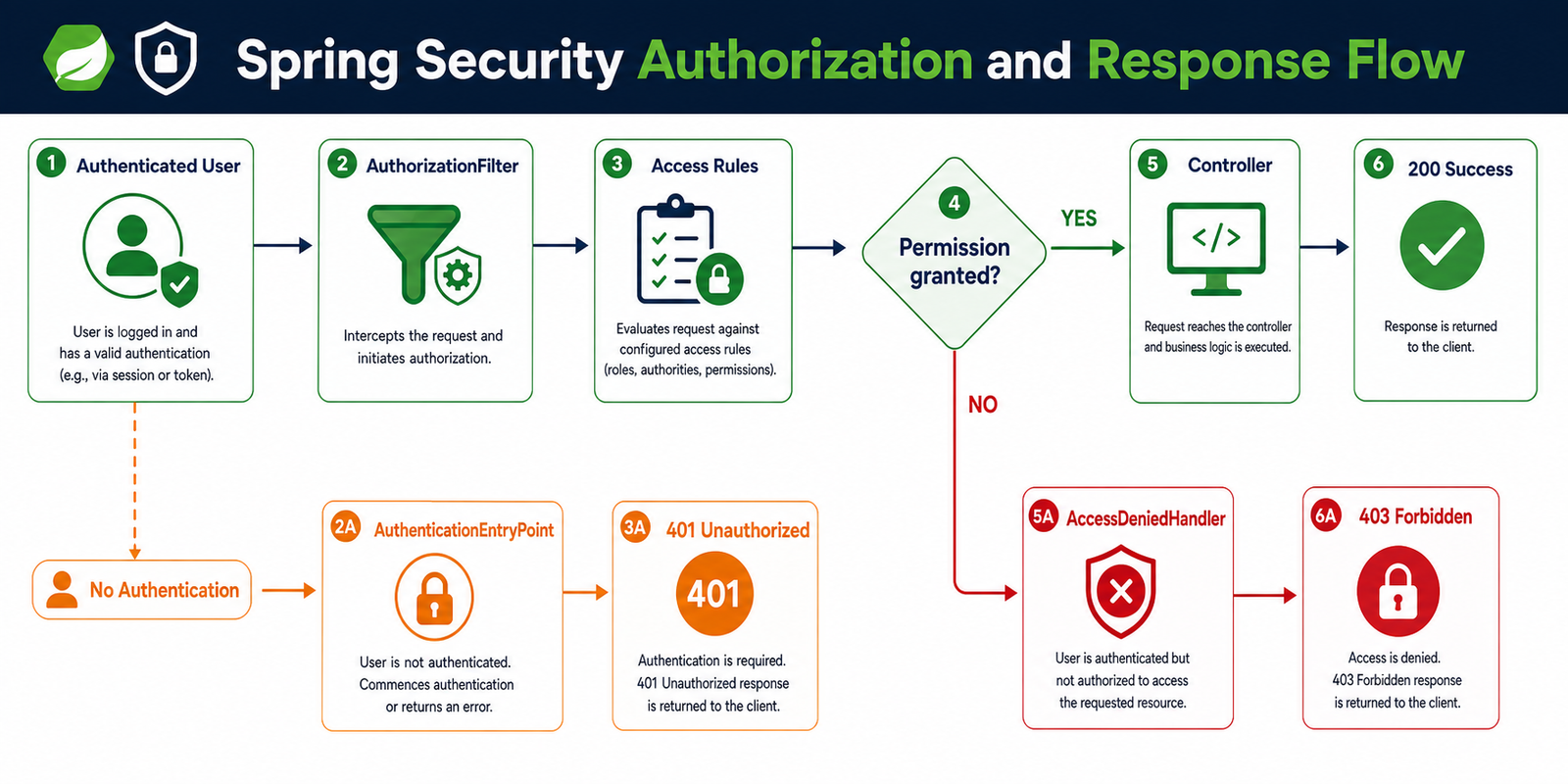
On success, the provider loads the user, verifies the password, creates an authenticated Authentication, stores it in the security context, and allows authorization to continue. On failure, the context is not authenticated and an AuthenticationEntryPoint returns 401 Unauthorized.
401 means the client is not authenticated. 403 means the client is authenticated but lacks permission.
15. Custom 401 and 403 Responses
.exceptionHandling(exception -> exception
    .authenticationEntryPoint((request, response, error) -> {
        response.sendError(401, "Authentication required");
    })
    .accessDeniedHandler((request, response, error) -> {
        response.sendError(403, "Access denied");
    })
)
16. Session-Based Authentication
In a traditional web application, the server stores the authenticated context in a session and the browser sends a JSESSIONID cookie on later requests.
.sessionManagement(session -> session
    .sessionCreationPolicy(SessionCreationPolicy.IF_REQUIRED)
)
Use Spring Session with JDBC or Redis when sessions must be shared across application instances.
17. Stateless JWT Authentication
For a REST API, the client commonly sends a bearer token with every request. The server validates the token and recreates the authentication for that request without storing a session.
GET /api/employees
Authorization: Bearer eyJhbGciOiJIUzI1NiJ9...
A JWT contains a header, payload, and signature. Do not put passwords or other sensitive secrets in its payload. Use HTTPS, validate issuer, audience, signature, and expiration, and define a refresh-token or revocation strategy.
18. Recommended JWT Resource Server Configuration
For production applications, prefer Spring Security’s OAuth2 Resource Server support over maintaining a large custom token filter.
<dependency>
  <groupId>org.springframework.boot</groupId>
  <artifactId>spring-boot-starter-oauth2-resource-server</artifactId>
</dependency>
@Bean
SecurityFilterChain apiSecurity(HttpSecurity http) throws Exception {
http
.csrf(csrf -> csrf.disable())
.sessionManagement(session -> session
.sessionCreationPolicy(SessionCreationPolicy.STATELESS))
.authorizeHttpRequests(auth -> auth
.requestMatchers("/api/auth/**").permitAll()
.requestMatchers("/api/admin/**").hasRole("ADMIN")
.anyRequest().authenticated())
.oauth2ResourceServer(oauth2 -> oauth2.jwt(Customizer.withDefaults()));
return http.build();
}spring.security.oauth2.resourceserver.jwt.issuer-uri=https://auth.example.com/realms/app19. Custom JWT Filter Flow
Read Authorization header
       ↓
Extract Bearer token
       ↓
Validate signature and expiration
       ↓
Create Authentication
       ↓
Store it in SecurityContextHolder
       ↓
Continue the filter chain
If a custom filter is required, extend OncePerRequestFilter, skip requests without a bearer token, avoid replacing an existing authentication, and add the filter before UsernamePasswordAuthenticationFilter.
20. CSRF Protection
CSRF primarily affects browser applications where cookies are sent automatically. Keep CSRF protection enabled for session-based applications. A stateless API using bearer tokens in the authorization header may disable it only after reviewing its threat model.
// Browser/session application
.csrf(Customizer.withDefaults())

// Stateless bearer-token API, after threat-model review
.csrf(csrf -> csrf.disable())
21. CORS Configuration
CORS controls which browser origins can call the API. Allow exact trusted origins and do not combine wildcard origins with credentials.
@Bean
CorsConfigurationSource corsConfigurationSource() {
    CorsConfiguration config = new CorsConfiguration();
    config.setAllowedOrigins(List.of("https://javacodeex.com"));
    config.setAllowedMethods(List.of("GET", "POST", "PUT", "DELETE"));
    config.setAllowedHeaders(List.of("Authorization", "Content-Type"));

    UrlBasedCorsConfigurationSource source =
        new UrlBasedCorsConfigurationSource();
    source.registerCorsConfiguration("/**", config);
    return source;
}
22. Logout and Remember-Me
.logout(logout -> logout
    .logoutUrl("/logout")
    .invalidateHttpSession(true)
    .clearAuthentication(true)
    .deleteCookies("JSESSIONID")
)
JWT logout usually requires short-lived access tokens, refresh-token revocation, a token blacklist, or key rotation. If remember-me is enabled, store the key outside source control and review the security trade-off carefully.
23. OAuth2 Login
OAuth2 login supports providers such as Google, GitHub, Microsoft, Okta, and Keycloak.
<dependency>
  <groupId>org.springframework.boot</groupId>
  <artifactId>spring-boot-starter-oauth2-client</artifactId>
</dependency>

http.oauth2Login(Customizer.withDefaults());
Keep client IDs and client secrets in environment variables or a secret manager; never commit them to Git.
24. SecurityContextHolder and SecurityContext
The security context contains the current user’s Authentication. You can inject Authentication directly into a controller method:
@GetMapping("/profile")
public Map<String, Object> profile(Authentication authentication) {
    return Map.of(
        "username", authentication.getName(),
        "authorities", authentication.getAuthorities());
}
For sessions, a SecurityContextRepository persists the context between requests. For stateless JWT, the context is normally rebuilt from the token on every request.
25. Testing Spring Security
<dependency>
  <groupId>org.springframework.security</groupId>
  <artifactId>spring-security-test</artifactId>
  <scope>test</scope>
</dependency>
@SpringBootTest
@AutoConfigureMockMvc
class EmployeeControllerTest {
@Autowired MockMvc mockMvc;
@Test
@WithMockUser(username = "anand", roles = "USER")
void userCanReadEmployees() throws Exception {
mockMvc.perform(get("/api/employees"))
.andExpect(status().isOk());
}
@Test
@WithMockUser(roles = "USER")
void userCannotAccessAdminEndpoint() throws Exception {
mockMvc.perform(delete("/api/admin/employees/1"))
.andExpect(status().isForbidden());
}
}26. Security Best Practices
- Use BCrypt or Argon2 and never log passwords.
- Use HTTPS, strong JWT signing keys, short token lifetimes, and validated issuer/audience claims.
- Deny access by default and explicitly allow only public endpoints.
- Use method security for important business operations.
- Keep secrets in a secret manager or environment variables.
- Restrict CORS to trusted origins and avoid exposing stack traces.
- Rate-limit login attempts and monitor authentication failures.
- Test both successful requests and 401/403 failure paths.
- Keep Spring Boot and security dependencies updated.
27. Common Spring Security Questions
What is SecurityFilterChain?
It defines the filters and security rules applied to matching HTTP requests.
What is UserDetailsService?
It loads the username, encoded password, and authorities needed for username/password authentication.
Why are 401 and 403 different?
401 means authentication is missing or invalid. 403 means authentication succeeded but authorization failed.
Why use OncePerRequestFilter for JWT?
It provides a convenient base for executing custom request authentication once for each applicable request dispatch.
28. Final Spring Security Flow
Client
  ↓
DelegatingFilterProxy → FilterChainProxy → SecurityFilterChain
  ↓
Form / Basic / JWT / OAuth2 authentication filter
  ↓
AuthenticationManager → AuthenticationProvider
  ↓
UserDetailsService → Database
  ↓
PasswordEncoder → Authentication → SecurityContextHolder
  ↓
AuthorizationFilter
  ↓
REST Controller → Service → Response
Further Reading
Continue learning with these related Spring Boot and Spring Security tutorials:
Continue learning