
Spring Boot Project Structure
Typical production project
-
src
-
main
-
java/com/javacodeex/orders
- OrderServiceApplication.javaapplication entry point
-
common
- config
- exception
- response
-
order
- controller
-
dto
- OrderRequest.java
- OrderResponse.java
- entity
- repository
- service
-
resources
- application.properties
- application-dev.properties
- application-test.properties
- application-prod.properties
- db/migration
- static
- templates
-
java/com/javacodeex/orders
- test/java/com/javacodeex/ordersunit and integration tests
-
main
- pom.xmldependencies and build
- Dockerfilecontainer image
- README.mdproject documentation
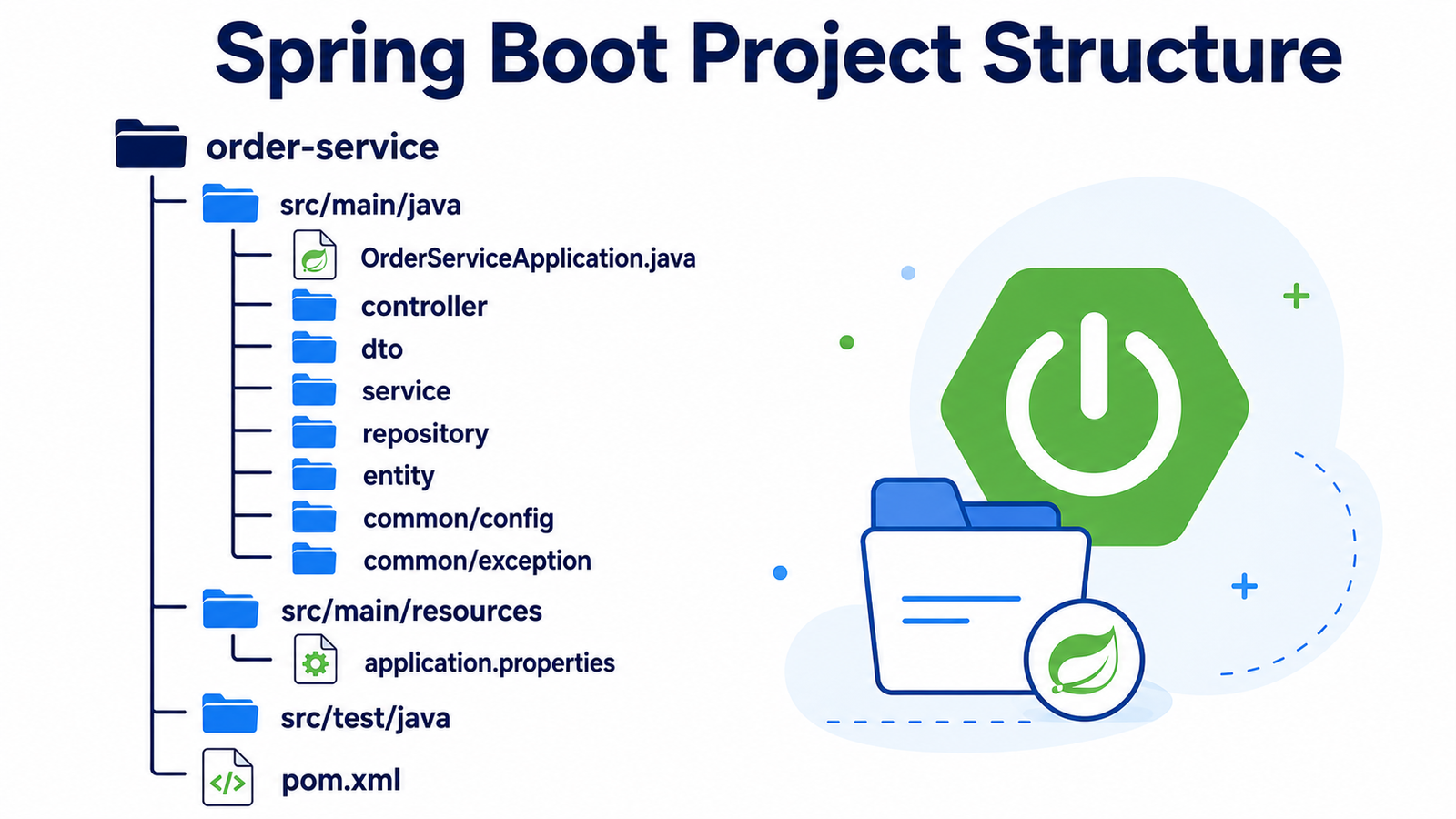
Package responsibilities
| Package | Responsibility |
|---|---|
controller |
Receives HTTP requests, validates input, and returns HTTP responses. |
dto |
Defines request and response shapes exposed by the API. |
service |
Contains business rules and coordinates repositories or external clients. |
repository |
Reads and writes data through JPA, JDBC, or another data source. |
entity |
Represents persistence objects mapped to database tables. |
exception |
Contains custom exceptions and the global exception handler. |
config |
Contains reusable Beans, security, client, and application configuration. |
Main application class
Place the main class in the root package. Component scanning then discovers controllers, services, repositories, and configuration below it.
package com.javacodeex.orders;

@SpringBootApplication
public class OrderServiceApplication {
    public static void main(String[] args) {
        SpringApplication.run(OrderServiceApplication.class, args);
    }
}
Controller layer
The controller is the HTTP boundary. It should translate request data into a service call and return an appropriate status code. Keep database queries and business rules out of the controller.
@RestController
@RequestMapping("/api/orders")
class OrderController {
    private final OrderService orderService;

    OrderController(OrderService orderService) {
        this.orderService = orderService;
    }

    @PostMapping
    ResponseEntity<OrderResponse> create(
            @Valid @RequestBody OrderRequest request) {
        OrderResponse response = orderService.create(request);
        return ResponseEntity.status(HttpStatus.CREATED).body(response);
    }
}
Request and response DTOs
DTOs protect the API contract from database implementation details. A request DTO accepts only allowed input, while a response DTO exposes only the fields clients need.
public record OrderRequest(
        @NotBlank String customerName,
        @Positive BigDecimal total) { }

public record OrderResponse(
        Long id,
        String customerName,
        BigDecimal total,
String status) { }Service layer
The service layer owns business decisions. It can validate business rules, coordinate multiple repositories, manage transactions, and map entities to response DTOs.
@Service
class OrderService {
    private final OrderRepository orderRepository;

    OrderService(OrderRepository orderRepository) {
        this.orderRepository = orderRepository;
    }

    @Transactional
    OrderResponse create(OrderRequest request) {
        Order order = new Order(request.customerName(), request.total());
        Order saved = orderRepository.save(order);
        return new OrderResponse(
                saved.getId(), saved.getCustomerName(),
                saved.getTotal(), saved.getStatus().name());
    }
}
Repository layer
The repository hides persistence details from the service. With Spring Data JPA, an interface is enough for many common operations because Spring creates the implementation.
@Repository
interface OrderRepository extends JpaRepository<Order, Long> {
    List<Order> findByCustomerNameIgnoreCase(String customerName);
}
Keep query methods and database-specific logic in this layer. The service should ask for business data rather than construct SQL throughout the application.
Global exception handling
Put common API error handling in one place. Controllers can throw meaningful custom exceptions, while the global handler converts them into a consistent response.
@RestControllerAdvice
class GlobalExceptionHandler {
    @ExceptionHandler(OrderNotFoundException.class)
    ResponseEntity<ApiError> handleNotFound(
            OrderNotFoundException ex) {
        ApiError error = new ApiError(
                "ORDER_NOT_FOUND", ex.getMessage());
        return ResponseEntity.status(HttpStatus.NOT_FOUND).body(error);
    }

    @ExceptionHandler(MethodArgumentNotValidException.class)
    ResponseEntity<ApiError> handleValidation(
            MethodArgumentNotValidException ex) {
        return ResponseEntity.badRequest()
                .body(new ApiError("VALIDATION_ERROR", "Check the request"));
    }
}

public record ApiError(String code, String message) { }
Configuration package
Use a configuration package for reusable Beans and integration settings. Configuration classes should assemble objects, not contain business workflows.
@Configuration
class ClientConfiguration {
    @Bean
    RestTemplate restTemplate(RestTemplateBuilder builder) {
        return builder
                .setConnectTimeout(Duration.ofSeconds(3))
                .setReadTimeout(Duration.ofSeconds(5))
                .build();
    }
}
Multiple environment property files
Keep common values in application.properties and store
environment differences in profile-specific files. The same JAR can then
run in development, testing, staging, and production.
# src/main/resources/application.properties
spring.application.name=order-service
spring.profiles.active=${SPRING_PROFILES_ACTIVE:dev}
server.servlet.context-path=/api

# application-dev.properties
server.port=8081
spring.datasource.url=jdbc:h2:mem:orders
logging.level.com.javacodeex.orders=DEBUG

# application-test.properties
server.port=0
spring.datasource.url=jdbc:h2:mem:test-orders
logging.level.root=WARN

# application-prod.properties
server.port=8080
spring.datasource.url=${ORDERS_DATABASE_URL}
spring.datasource.username=${ORDERS_DATABASE_USER}
spring.datasource.password=${ORDERS_DATABASE_PASSWORD}
logging.level.root=INFO
Activate a profile at runtime:
java -jar order-service.jar --spring.profiles.active=prod

# Or set it in the deployment environment
SPRING_PROFILES_ACTIVE=prodResources, migrations, and tests
-
src/main/resources/staticcontains files served directly, such as public images or browser assets. -
src/main/resources/templatescontains server-rendered templates when using a template engine. -
db/migrationcommonly contains Flyway versioned migrations such asV1__create_orders.sql. -
src/test/javamirrors production packages so tests are easy to find. -
src/test/resourcescan contain test-only properties and fixtures.
Package and layering rules
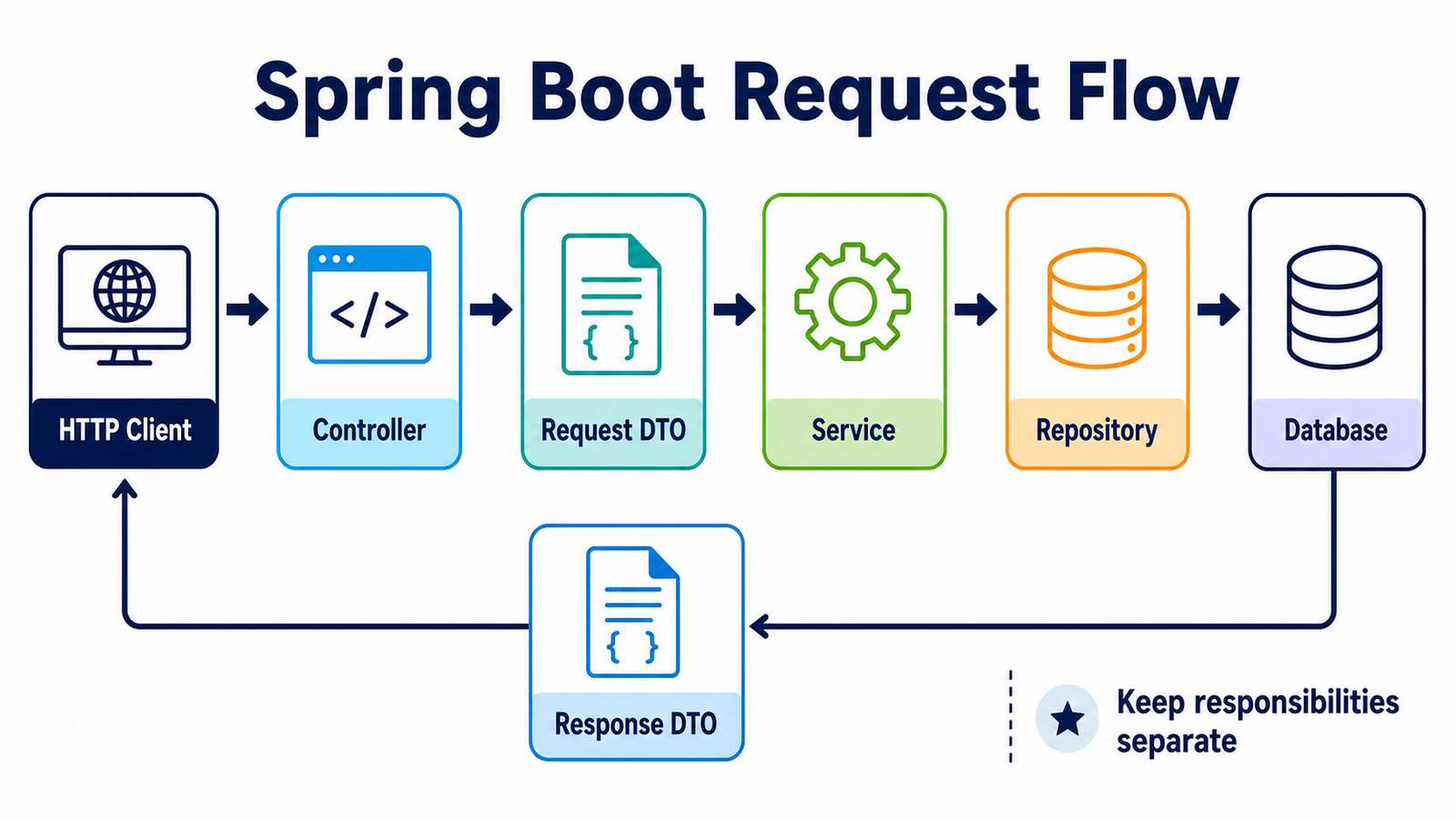
- Controllers depend on services, not directly on repositories.
- Services contain business rules and can use repositories or external clients.
- Repositories handle persistence and should not decide HTTP status codes.
- DTOs define the API boundary; entities define the persistence model.
- Configuration creates shared infrastructure such as HTTP clients and security Beans.
- Keep packages below the main application package unless component scanning is configured deliberately.
Continue learning